 Tagferry
How to avoid selling the same item twice when crosslisting
By VibeWorks, the team behind Tagferry ·Published
To avoid selling the same item twice, remove it from every other marketplace as soon as it sells on one. Double sales happen in the time between the first sale and that removal, so the aim is to make the gap as short as possible: check sold notifications often, delist straight away, or use a tool that watches your listings and alerts you.
Why a double sale costs more than one refund
Each marketplace treats a cancelled sale differently. These rules were checked on 19 November 2026.
- eBay. eBay's order cancellation policysays that cancelling because an item is out of stock results in a transaction defect. Itsseller standards policynames selling the item to someone else as one such case and allows defects on no more than 2% of transactions. Below that standard, eBay can limit your selling and charge higher final value fees. The policy also forbids choosing a wrong cancellation reason to avoid the defect.
- Depop. Section 7 of Depop's terms of serviceallows crosslisting tools only if you remove the Depop listing promptly when the item sells elsewhere, and accept full responsibility, including refunding the buyer, if it sells on both.
- Vinted. Vinted's help page My order was cancelledtells sellers who cancel before shipping to inform the buyer, to avoid automatic negative feedback.
On top of that, the buyer you let down may leave a poor review or not come back.
A routine that closes the gap
- Keep one list of where each item is live. A spreadsheet works: item, Vinted link, Depop link, eBay link. Without it, you have to remember which sites each item is on at the moment it sells.
- Check sale notifications are on. Look in each marketplace app’s notification settings and make sure sales reach your phone for every site you list on.
- Delist before you pack. When a sale comes in, remove the other listings first, then deal with postage.
- Check sold items at set times. A look at each site’s sold list morning and evening catches anything a notification missed.
- Hold back one-offs you cannot watch. If you are away for a few days, take your most-viewed items off the smaller sites until you are back.
Let a crosslister watch for you
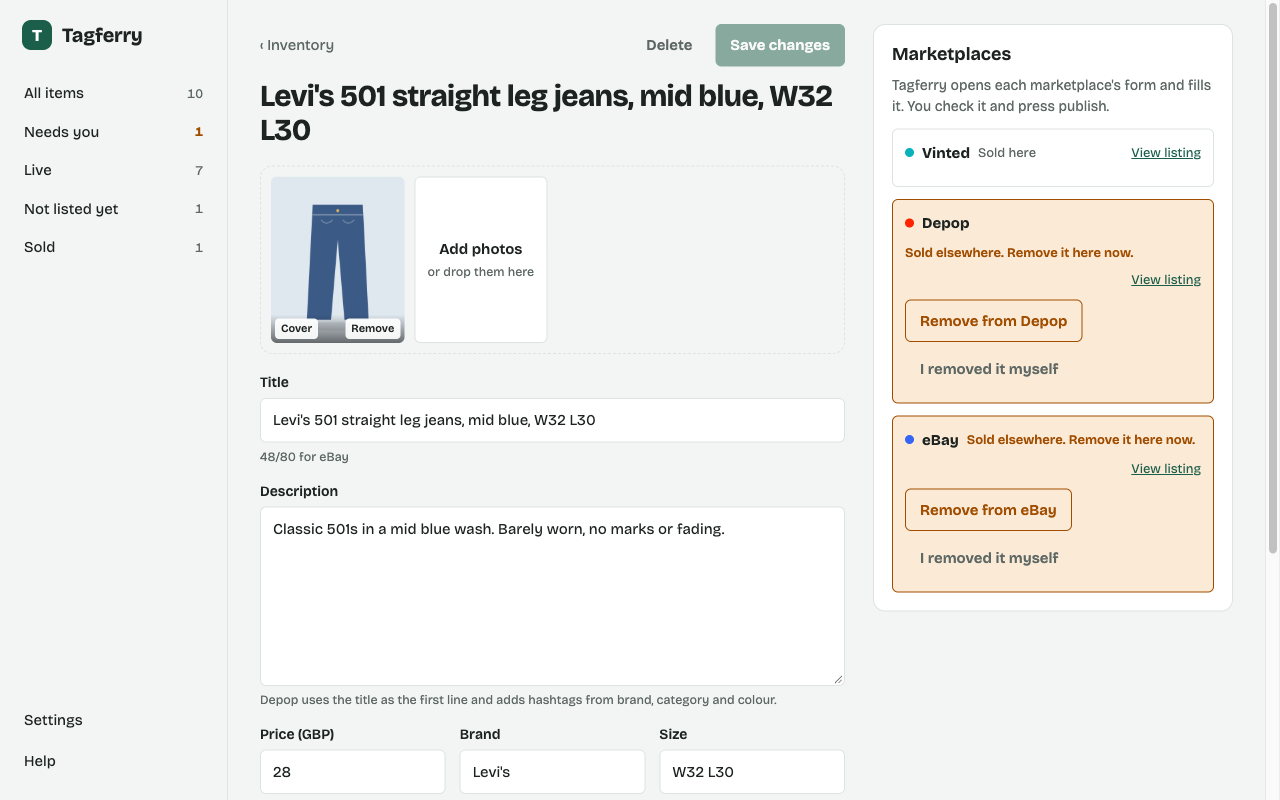
Tagferry does the checking part. It reads the public pages of items that are live on two or more of Vinted, Depop and eBay, every 10 minutes by default and as often as every 5, while Chrome is open. When one sells, a notification offers Delist everywhere now, which opens each other listing and removes it. If a marketplace's page has changed and the removal does not work, Tagferry tells you, and you remove that listing by hand.
It has one limit worth knowing: it does not check while Chrome is closed. If you sell a lot overnight, check your sold items in the morning before relying on the alerts.
If you listed an item on two sites before you installed Tagferry, open it in Tagferry and add the second link, so the sale checks cover both. The guide shows where.
If it happens anyway
- Contact the second buyer straight away and explain.
- Cancel the order using the reason that matches what happened. On eBay, do not choose “buyer asked to cancel” unless they did.
- Check the refund has gone through, and remove any other listings still live.
More on each pair of sites: Vinted and Depop,Vinted to eBay, eBay to Vinted and theDepop crosslister.
Questions people ask
What happens if I sell the same item twice on eBay?
You have to cancel one order. If you cancel an eBay order because the item is out of stock or sold to someone else, eBay records a transaction defect. Too many defects can drop you to Below Standard, which adds to your final value fees and can limit your selling.
What happens if an item sells on Depop and somewhere else?
Depop’s terms make you responsible: you must remove the Depop listing promptly when the item sells elsewhere, and if it sells on both, you must refund the Depop buyer.
Can I cancel a Vinted order if the item already sold?
Yes, before you ship it. Vinted advises telling the buyer when you cancel, so the cancellation does not leave automatic negative feedback.
Does Tagferry check for sales when my computer is off?
No. Tagferry checks while Chrome is open, every 10 minutes by default. When you reopen Chrome, it checks again within a few minutes.